How to find the total length of any YouTube playlist
YouTube shows the length of each video, but it never shows a playlist’s total. If you want to know whether a course, a series or a watch-later list fits your week, you have to add the durations yourself — or use a tool that does it for you.
Why the total is missing
A playlist page is built for browsing, not planning. It lists videos one by one, and the only totals it hints at are video counts. That is why a 40-video course can quietly be 12 hours long.
The simple method
Write down each video’s duration in minutes and seconds, convert any hours to minutes, add them all, then convert back. A calculator does the same addition and also handles the awkward minutes-to-hours carry for you.
Watch out for private and deleted videos
Videos that are private, deleted or region-blocked do not appear in a public playlist’s visible list, so a total based on visible videos can understate the original playlist. If your total looks short, that is the usual reason.
Worked example
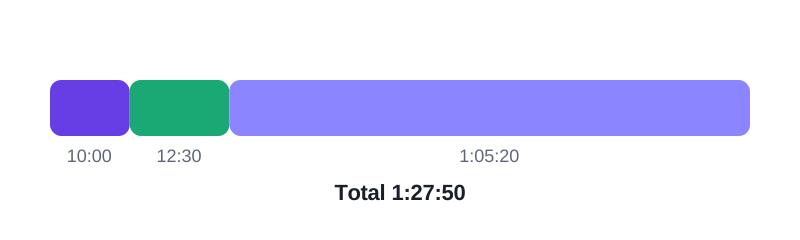
Take three videos — 10:00, 12:30 and 1:05:20. Added together they are 1 hour, 27 minutes and 50 seconds (1:27:50). Paste those three durations into the calculator and it returns the same 1:27:50, plus the average video length of 29:17.
Frequently asked questions
Can I get the total without signing in?
Yes. Adding visible video durations needs no account, and this calculator works from durations you paste in.
Does it work for a private playlist?
Only for videos you can see. A private playlist’s durations are not public, so you would need to paste them yourself.
Why is my total different from a friend’s?
Usually because one of you counted a private or deleted video, or because a video’s length changed after an edit.
Paste your video durations and get the total, the time at faster speeds, and the days to finish.